Appendix A.3

Standard predicates for graphs and forests visualization


Graph(Out G)

Declare graphs by enumeration

Description:

the visualization system repeatedly calls this predicate to build one or more graphs.The view that will contain each graph is automatically created by the visualization system, without any declaration of the user.

Note: the title of the view containing the graph consists of the name of the running program followed by the string ": Graph" and then by the ID of the graph itself.

Predicate type:

standard enumerative

Parameters:

G

ID of the graph(s) to be declared

Related predicates:

Node,Arc,Directed: in order to define completely the graph, its nodes and arcs (directed or not) have to be declared.

Example:

/** Graph(Out 1); **/

"Declare a graph named 1."

If no node is declared to be in the graph, the result will be an empty window onto the screen.


Tree(Out T)

Declare forests by enumeration

Description:

the visualization system repeatedly calls this predicate to build one or more forests.The view that will contain each forest is automatically created by the visualization system, without any declaration of the user.

Note: the title of the view containing the forest consists of the name of the running program followed by the string ": Tree" and then by the ID of the forest itself.

Predicate type:

standard enumerative

Parameters:

T

ID of the forest(s) to be declared

Related predicates:

Node,Arc,Directed: in order to define completely the forest, its nodes and arcs (directed or not) have to be declared. Moreover, it is possible defining its roots through the predicate Root.

Example:

/** Tree(Out 1); **/

"Declare a forest named 1."

If no node is declared to be in the forest, the result will be an empty window onto the screen.


Root(Out R,F)

Declare the roots of the forest F by enumeration

Description:

the visualization system repeatedly calls this predicate for each forest F to gather its roots.

Note: if the roots of some trees in the forest are not specified, they are automatically found by the visualization system (if the tree is not directed, a node is randomly chosen as root). It is also possible specifying no root at all.

Note: the roots explicitily specified are drawn from left to right according to the order in which they have been enumerated by the predicate Root . On the contrary, nothing can be said about the order of roots found by the visualization system.

Note: roots must have no incoming arc. If this happens, the wrong declaration is not considered for not directed trees, while an error message is produced in directed trees.

Predicate type:

standard enumerative

Parameters:

R

ID of the node(s) of the forest F to be considered as roots

F

ID of the forest that the roots belong to

Example:

/**

Tree(Out 1);

Node(Out N,1) For N: InRange(N,1,7);

Arc(X,Y,1) If Y==3*X || Y==3*X+1 || Y==3*X+2;

Root(Out 5,1);

**/

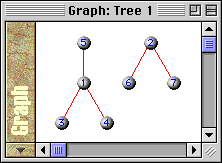
"Declare a forest with ID equal to 1. Declare 7 nodes in forest 1, numbered from 1 to 7. Then declare arcs: all the arcs starting from a node X go to the nodes with ID 3*X or 3*X+1 or 3*X+2. At last, declare that the node with ID 5 is a root in the forest. Note that this is not the only root, but the other ones are automatically found by the visualization system."

This example yields the following result:
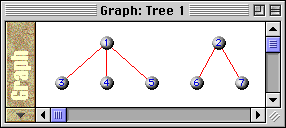
Without specifying that 5 must be considered a root, we obtain the following result:
Tip:

usually it is not necessary specifying the roots of directed trees: indeed, they can be chosen only in one way and the visualization system is able to do it for you. On the other hand, it is a good choice enumerating roots for directed forests when you want them to be drawn in a particular order.
 

Directed(G)

Declare arcs of graph G to be directed

Description:

the visualization system repeatedly calls this predicate for each graph/forest G to know if its arcs are directed or not.

Default:

by default arcs are not directed

Predicate type:

standard boolean

Parameters:

G

ID of the graph/forest whose arcs' orientation is being declared

Example:

/** Directed(1); **/

"Declare the graph/forest with ID 1 to have directed arcs."

If the code of this example is added to that of the Graph, Node and Arc standard predicates, the following result would be obtained:


Node(Out N,G)

Declare the nodes of the graph/forest G by enumeration

Description:

the visualization system repeatedly calls this predicate for each graph and forest to build their nodes.

Note: the ID of the node is automatically shown on it, unless the user explicitily specifies its name through the NodeName predicate.

Predicate type:

standard enumerative

Parameters:

N

ID of the node(s) to be declared

G

ID of the graph/forest that will contain the node(s).

Note: if nodes' positions are not explicitely given through the predicate NodePos, Leonardo's visualization system uses its standard drawing techniques.

In particular, if G has been declared through the predicate Graph:

- if the visualization system is able to find a currently open graph window or a graph file containing a graph "similar" to G, then its drawing is used;

- otherwise, nodes are trivially put on a circle.

If G as been declared through the predicate Tree, an automatic forest drawing algorithm is used. If the roots have not been specified by the user through the predicate Root, they are automatically detected by the visualization system (they are randomly chosen if G is not directed.)

Attributes:

NodeColor, NodeFrame, NodeLabel, NodeLabelColor, NodeName, NodePos , NodeShape

Example:

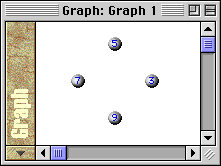
/** Node(Out N,1) For N: InRangeStep(N,3,9,2); **/

"Declare four nodes belonging to the graph/forest named 1 and called 3, 5, 7 and 9."

If the code of this example is added to that of the Graph standard predicate, the following result would be obtained:

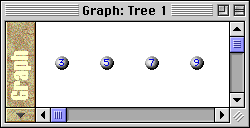
If the code of this example is added to that of the Tree standard predicate, the following result would be obtained:


NodeColor(N,Out C,G)

Declare the filling color C of the node with ID equal to N in the graph/forest G

Description:

the visualization system repeatedly calls this predicate for each graph/forest G and for each node N in it to gather the filling color of the node.

Default:

if NodeColor is not declared or is false for a given node, the default color is No_Color. In this case the node has its standard appearance, as shown in the following example for the node with ID 9.

Predicate type:

standard single value

Parameters:

N

ID of the node we are explicitly giving a fillling color

C

filling color of the node with ID equal to N in the graph/forest G

G

ID of the graph/forest that the node with ID equal to N belongs to

Example:

/** NodeColor(N,Out C,1) If N!=9 Assign C=N; **/

"Declare the filling color of nodes having IDs other than 9 in the graph/forest 1 to be its ID value."

See the table of colors for further details about the colors' numeric constants.

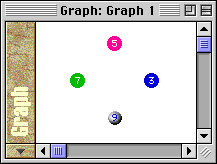
If the code of this example is added to that of the Graph and Node standard predicates, the following result would be obtained (note node with ID 9 has its standard appearance, since its color has not been declared:)


NodeFrame(N,Out C,Out T,G)

Declare a frame around the node with ID equal to N in the graph/forest G

Description:

the visualization system repeatedly calls this predicate for each graph/forest G and for each node N in it to gather color and thickness of the frame around the node .

Default:

if NodeFrame is not declared, by default nodes have no frame;

if NodeFrame is false for a given node N, that node has no frame.

Predicate type:

standard single value

Parameters:

N

ID of the node we are surrounding with a frame

C

color of the frame that surrounds the node with ID equal to N in the graph/forest G

T

thickness (in pixels) of the frame that surrounds the node with ID equal to N in the graph/forest G

G

ID of the graph/forest that the node with ID equal to N belongs to

Example:

/**

NodeFrame(N,Out C,Out T,1)

Assign C,T In {

switch(N){

case 3: C=DarkMagenta; T=2; break;

case 5: C=LightGreen; T=5; break;

case 7: C=Orange; T=4; break;

case 9: C=Cyan; T=3; break;

}

};

**/

"Declare the frames around nodes of the graph/forest 1; for example the node with ID 3 has a DarkMagenta coloured 2 pixels thick frame."

See the table of colors and thickness for further details.

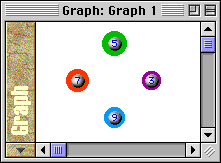
If the code of this example is added to that of the Graph and Node standard predicates, the following result would be obtained :


NodeLabel(N,Out T,Out L,G)

Declare the label of the node with ID equal to N in the graph/forest G

Description:

the visualization system repeatedly calls this predicate for each graph/forest G and for each node N in it to gather the type T and the text L of the label of that node.

Note: the visualization system shows the label of nodes under them.

Default:

if NodeLabel is not declared or is false for a given node N, the visualization system considers its type to be Void: in this way no label will be shown.

Predicate type:

standard single value

Parameters:

N

ID of the node we are explicitily giving a label

T

type of the label (Void, Int, Char or String)

L

text to be shown under the node N, according to the value of T:

T=Void

L is ignored: the label of node N is empty

T=Int

the label of node N is L as integer value

T=Char

the label of node N is the character value obtained from the least significant byte of L

T=String

the label of node N is the C string pointed to by L. If L=0 then the "Nil" string is shown.

G

ID of the graph/forest that the node with ID equal to N belongs to

Attributes:

NodeLabelColor

Example:

/**

NodeName(N,Out Void,Out 0,1);

NodeLabel(N,Out String,Out S,1)

If N<=3 || N>=7 Assign S="Hydrogen" Moreover

If N==4 || N==6 Assign S="Carbon" Moreover

If N==5 Assign S="Oxygen";

NodeColor(N,Out Black,1) If N==4 || N==6;

NodeColor(N,Out Red,1) If N==5;

**/

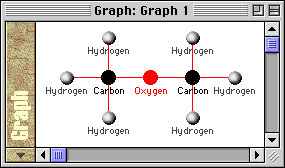
" Declare that no node have a name. Then declare that nodes have a label of type String and text containing the name of an element (hydrogen, carbon or oxygen.) At last declare that nodes showing different elements are assigned with different colors."

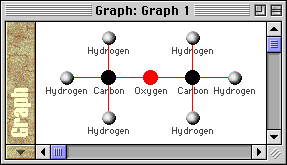
If this code is added to the code written in the NodePos standard predicate example, the following result would be obtained (a molecule of dimethylic ether:)


NodeLabelColor(N,Out C,G)

Declare the color of the label of the node with ID equal to N in the graph/forest G

Description:

the visualization system repeatedly calls this predicate for each graph/forest G and for each node N in it to gather the color of its label (if any.)

Default:

if NodeLabelColor is not declared or is false for a given node N, the visualization system considers its color to be Grey.

Predicate type:

standard single value

Parameters:

N

ID of the node we are explicitily giving a label

C

color of the label (if any) of node with ID equal to N in G

G

ID of the graph/forest that the node with ID equal to N belongs to

Example:

/** NodeLabelColor(N,Out C,1) For C: NodeColor(N,C,1); **/

" Declare that the label of a node has the same color of the node itself."

If this code is added to the code written in the NodePos and NodeLabel standard predicates examples, the following result would be obtained:


NodeName(N,Out T,Out S,G)

Declare the name of the node with ID equal to N in the graph/forest G

Description:

the visualization system repeatedly calls this predicate for each graph/forest G and for each node N in it to gather the type T and the text S of the name of that node.

Note: the visualization system shows the name of nodes on them.

Default:

if NodeName is not declared or is false for a given node N, the visualization system considers the ID of a node to be its name.

Predicate type:

standard single value

Parameters:

N

ID of the node we are explicitily giving a name

T

type of the text S (Void, Int, Char or String)

S

text to be shown on the node N, according to the value of T:

T=Void

S is ignored: the name of node N is empty

T=Int

the name of node N is S as integer value

T=Char

the name of node N is the character value obtained from the least significant byte of S

T=String

the name of node N is the C string pointed to by S. If S=0 then the "Nil" string is shown.

G

ID of the graph/forest that the node with ID equal to N belongs to

Example:

/**

Graph(Out 1);

Node(Out N,1) For N: InRange(N,0,6);

NodeShape(N,Out Square,1);

NodeName(N,Out T,Out S,1)

If N%4==1 Assign T=Void Moreover

If N%4==2 Assign T=Char S='°' Moreover

If N%4==3 Assign T=String S="Hi" ;

Arc(X,Y,1) If X%4==Y%4;

**/

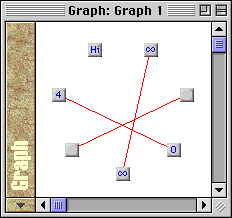
"Declare a graph with ID 1. This graph has 7 nodes whose IDs are the numbers from 0 to 6. Declare all nodes in the graph 1 to be squared. Then declare their names: nodes such that ID-1 is multiple of 4 have no name; nodes such that ID-2 is multiple of 4 have the name "°" of type Char; nodes whose ID-3 is multiple of 4 have the name "Hi" of type String; at last, all the other ones (their IDs are multiple of 4) have the ID itself as name. Note the last case doesn't need to be explicitily written: it depends on the default value for NodeName. At last, declare arcs between nodes with labels of the same type."

This example yields the following result:


NodePos(N,Out X,Out Y,G)

Declare the position of the node with ID equal to N in the graph/forest G

Description:

the visualization system repeatedly calls this predicate for each graph/forest G and for each node N in it to gather its position (X and Y coordinates.)

Note: we recall that X grows from left to right and Y from top to bottom and that they are relative to the left-top corner of the view automatically assigned to G (see Graph or Tree).

Default:

if NodePos is not declared, the visualization system uses its standard drawing techniques as described in the Node standard predicate. If NodePos is declared but is false for a given node N, it will be automatically drawn in the position (0,0).

Predicate type:

standard single value

Parameters:

N

ID of the node we are explicitily giving a position

X

X coordinate of node with ID equal to N in the graph/forest G

Y

Y coordinate of node with ID equal to N in the graph/forest G

G

ID of the graph/forest that the node with ID equal to N belongs to

Example:

/**

Graph(Out 1);

Node(Out N,1) For N: InRange(N,1,9);

Arc(X,Y,1) If (X==5 && (Y==4 || Y==6)) || (X==4 && Y<=3) || (X==6 && Y>=7);

NodePos(N,Out X,Out Y,1)

If N>=3 && N<=7 Assign Y=55 X=30+42*(N-3) Moreover

If N<=2 Assign X=72 Y=(N==1) ? 15 : 95 Moreover

If N>=8 Assign X=156 Y=(N==8) ? 15 : 95;

**/

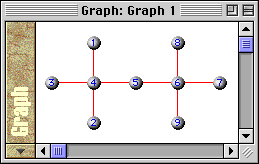
"Declare a graph with ID 1. It has 9 nodes whose IDs are the numbers from 1 to 9. Then declare the following arcs: (5,4), (5,6), (4,1), (4,2), (4,3), (6,7), (6,8) and (6,9). At last, declare explicitily the positions of all nodes according to their ID values."

This example yields the following result:


NodeShape(N,Out S,G)

Declare the shape S of the node with ID equal to N in the graph/forest G

Description:

the visualization system repeatedly calls this predicate for each graph/forest G and for each node N in it to gather the shape of the node.

Default:

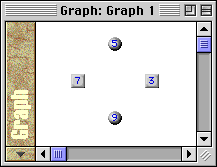
if NodeShape is not declared or is false for a given node, the default shape is Round (see nodes with IDs 5 and 9 in the following example.)

Predicate type:

standard single value

Parameters:

N

ID of the node we are explicitly giving a shape

S

shape of the node with ID equal to N in the graph/forest G

G

ID of the graph/forest that the node with ID equal to N belongs to

Example:

/** NodeShape(N,Out Square,1) If N%4!=1; **/

"Declare the shape of nodes with ID N such that N%4!=1 in the graph/forest 1 to be squared."

See the table of shapes for further details about the shapes' numeric constants.

If the code of this example is added to that of the Graph and Node standard predicates, the following result would be obtained :


Arc(X,Y,G)

Does the arc (X,Y) exist in the graph/forest G ?

Description:

the visualization system repeatedly calls this predicate for each graph/forest G and for each couple of nodes (X,Y) in it to decide if they are connected by an arc.

Note: if G has been declared through the predicate Tree but its arcs don't agree with the definition of forest (e.g. there is a cycle), the visualization will result G as a graph and an error message.

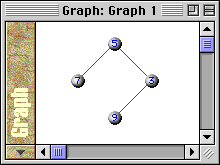
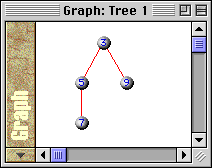
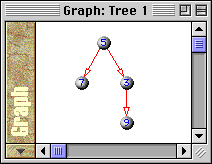
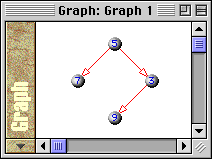
Note: if G is not directed, declaring arc (X,Y) is the same as declaring arc (Y,X) and it's not possible to suppose if the visualization system will ask first about the presence of (X,Y) or (Y,X). Hence it may happen that the user declares an arc but the reverse one will be visualized. This produces the same effect if G is a graph, but may imply a different visualization (from that the user expects) if G is a tree. This is what happens for arc (5,3) in the example below: when G is a tree, the visualization system draws the arc (3,5). On the contrary, when G is a directed tree, the visualization system draws the arc (5,3) (see the difference between the second and the third figure.)

Predicate type:

standard boolean

Parameters:

X

ID of an extreme of the arc (start node if G is directed)

Y

ID of an extreme of the arc (end node if G is directed)

G

ID of the graph/forest that will contain the arc

Attributes:

ArcColor, ArcLabel, ArcLabelColor, ArcOffset, ArcStyle , ArcThickness

Example:

/** Arc(X,Y,1) If (X==5 && (Y==3 || Y==7)) || (X==3 && Y==9); **/

"Declare the arcs (5,3), (5,7) and (3,9) in the graph/forest 1."

If the code of this example is added to that of the Graph and Node standard predicates, the following result would be obtained:

If the code of this example is added to that of the Tree and Node standard predicates, the following result would be obtained (note the root has been randomly chosen since the tree is not directed:)

If the code of this example is added to that of the Tree, Directed and Node standard predicates, the following result would be obtained (note the root has been chosen according to arcs' declarations since the tree is directed:)


ArcColor(X,Y,Out C,G)

Declare the color C of arc (X,Y) in the graph/forest G

Description:

the visualization system repeatedly calls this predicate for each graph/forest G and for each arc (X,Y) in it to gather the color of that arc.

Default:

if ArcColor is not declared or is false for a given arc (X,Y), the default color is Red.

Predicate type:

standard single value

Parameters:

X

ID of the start node of the arc we are coloring

Y

ID of the end node of the arc we are coloring

C

color of the arc (X,Y) in the graph/forest G

G

ID of the graph/forest that the arc (X,Y) belongs to

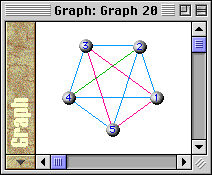
Example:

/**

Graph(Out 20);

Node(Out N,20) For N: InRange(N,1,5);

Arc(X,Y,20) If Y>X;

ArcColor(X,Y,Out C,20)

If X%2==0 && Y%2==0 Assign C=LightGreen Moreover

If X%2==1 && Y%2==1 Assign C=Magenta Moreover

If X%2!=Y%2 Assign C=Cyan;

**/

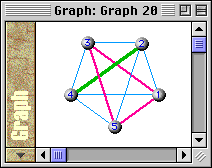
"Declare a graph with ID equal to 20. Declare 5 nodes in graph 20, numbered from 1 to 5. Then declare arcs between each pair of nodes. At last, declare the color of arcs in the following way: if start and end of an arc are both even, the arc is LightGreen; if they are both odd, the arc is Magenta; if they have a different parity, the arc is Cyan."

This example yields the following result:


ArcLabel(X,Y,Out T,Out L,G)

Declare the label of arc (X,Y) in the graph/forest G

Description:

the visualization system repeatedly calls this predicate for each graph/forest G and for each arc (X,Y) in it to gather the type T and the text L of the label of that arc.

Note: the visualization system shows arc labels next to the arcs.

Default:

if ArcLabel is not declared or is false for a given arc (X,Y), the visualization system considers its type to be Void: in this way no label will be shown.

Predicate type:

standard single value

Parameters:

X

ID of the start node of the arc we are giving a label

Y

ID of the end node of the arc we are giving a label

T

type of the label (Void, Int, Char or String)

L

text to be shown near the arc (X,Y), according to the value of T:

T=Void

L is ignored: the label of arc (X,Y) is empty

T=Int

the label of arc (X,Y) is L as integer value

T=Char

the label of arc (X,Y) is the character value obtained from the least significant byte of L

T=String

the label of arc (X,Y) is the C string pointed to by L. If L=0 then the "Nil" string is shown.

G

ID of the graph/forest that the arc (X,Y) belongs to

Attributes:

ArcLabelColor

Example:

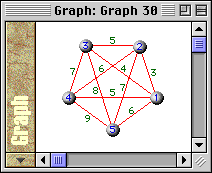
/**

Graph(Out 30);

Node(Out N,30) For N: InRange(N,1,5);

Arc(X,Y,30) If Y>X;

ArcLabel(X,Y,Out Int,Out L,30) Assign L=Y+X;

**/

"Declare a graph with ID equal to 30. Declare 5 nodes in graph 30, numbered from 1 to 5. Then declare arcs between nodes with smaller ID to nodes with greater ID. At last, declare the label of an arc (X,Y) as the integer value equal to the sum X+Y."

This example yields the following result:


ArcLabelColor(X,Y,Out C,G)

Declare the color C of the label of arc (X,Y) in the graph/forest G

Description:

the visualization system repeatedly calls this predicate for each graph/forest G and for each arc (X,Y) in it to gather the color of its label (if any.)

Default:

if ArcLabelColor is not declared or is false for a given arc (X,Y), the visualization system considers its color to be Green.

Predicate type:

standard single value

Parameters:

X

ID of the start node of the arc whose label we are coloring

Y

ID of the end node of the arc whose label we are coloring

C

color of the label (if any) of arc (X,Y) in G

G

ID of the graph/forest that the arc (X,Y) belongs to

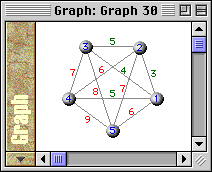
Example:

/**

ArcColor(X,Y,Out Grey,30);

ArcLabelColor(X,Y,Out Red,30) If X+Y>5;

**/

"Declare that arcs are Grey and that the label of a generic arc (X,Y) is Red if the value of X+Y is bigger than the constant 5."

If this code is added to the code written in the ArcLabel standard predicate example, the following result would be obtained:


ArcOffset(X,Y,Out K,G)

Declare the offset K of arc (X,Y) in the graph/forest G

Description:

the visualization system repeatedly calls this predicate for each graph/forest G and for each arc (X,Y) in it to gather the offset K of that arc.

Note: the offset of an arc may be a either 0 or a positive or a negative integer value. In the first case the arc will be drawn as a straight line. Otherwise, it will be drawn as an arc of a circle whose distance (in the most distant point) from the chord subtending it is |K|; according to the fact K is positive or negative, the arc will be positioned on the left or on the right of the imaginary line going from X to Y.

Default:

if ArcOffset is not declared or is false for a given arc (X,Y), the default value is 0.

Predicate type:

standard single value

Parameters:

X

ID of the start node of the arc we are giving an offset

Y

ID of the end node of the arc we are giving an offset

K

offset of arc (X,Y) in G

G

ID of the graph/forest that the arc (X,Y) belongs to

Example:

/**

Graph(Out 10);

Node(Out N,10) For N: InRange(N,1,5);

NodePos(N,Out X,Out Y,10) Assign Y=50 X=N*25;

Arc(X,Y,10);

ArcOffset(X,Y,Out K,10) Assign K= ((X-Y)%2==0) ? (-10)*(X-Y) : 10*(X-Y);

**/

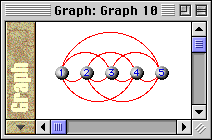
"Declare a graph with ID equal to 10 and with 5 nodes (numbered from 1 to 5). Declare that nodes are placed on an horizontal line and all of them are connected by an arc. At last, declare that the offset of an arc (X,Y) is proportional to the distance between nodes X and Y; moreover, arcs between nodes with an even /odd distance are placed on opposite sides (note the scale factor is negative and positive, respectively.)"

This example yields the following result:


ArcStyle(X,Y,Out S,G)

Declare the style S of arc (X,Y) in the graph/forest G

Description:

the visualization system repeatedly calls this predicate for each graph/forest G and for each arc (X,Y) in it to gather its style.

Default:

if ArcStyle is not declared or is false for a given node N, the default style is Solid.

Predicate type:

standard single value

Parameters:

X

ID of the start node of the arc we are giving a style

Y

ID of the end node of the arc we are giving a style

S

style of the arc (X,Y) in the graph/forest G

G

ID of the graph/forest that the arc (X,Y) belongs to

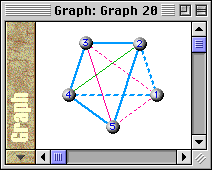
Example:

/**

ArcThickness(X,Y,Out Thick,20) If X%2!=Y%2;

ArcStyle(X,Y,Out Dashed,20) If X==1 || Y==1;

**/

"Declare that an arc (X,Y) is Thick if its start and end nodes have a different parity. Then declare that all arcs starting from/ ending in node 1 are Dashed."

If this code is added to the code written in the ArcColor standard predicate example, the following result would be obtained:


ArcThickness(X,Y,Out T,G)

Declare the thickness T of arc (X,Y) in the graph/forest G

Description:

the visualization system repeatedly calls this predicate for each graph/forest G and for each arc (X,Y) in it to gather its thickness.

Default:

if ArcThickness is not declared or is false for a given arc (X,Y), the default thickness value is Thin.

Predicate type:

standard single value

Parameters:

X

ID of the start node of the arc we are giving a thickness

Y

ID of the end node of the arc we are giving a thickness

T

thickness (in pixel) of the arc (X,Y) in the graph/forest G

G

ID of the graph/forest that the arc (X,Y) belongs to

Example:

/**

ArcThickness(X,Y,Out Thick,20) If X%2==1 && Y%2==1;

ArcThickness(X,Y,Out VeryThick,20) If X%2==0 && Y%2==0;

**/

"Declare that an arc (X,Y) is Thick if X and Y are both odd and VeryThick if X and Y are both even."

If this code is added to the code written in the ArcColor standard predicate example, the following result would be obtained: